










Keep Match Closer one tap away
Add it as a shortcut on your phone: it opens full screen, like an app, without going through the browser.
You’re already using Match Closer as an app. Nice!
Tip: use Google Chrome. If Chrome shows an “Install Match Closer” prompt at the bottom, tap it and you’re done.
- 1
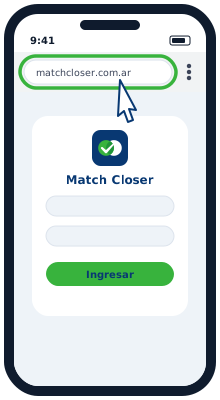
Open MatchCloser in Chrome
Go to matchcloser.com.ar in the Google Chrome browser.
- 2
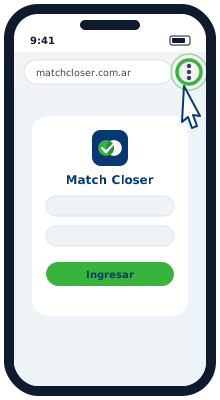
Tap the ⋮ menu
It’s the three dots at the top right, next to the address bar.
- 3
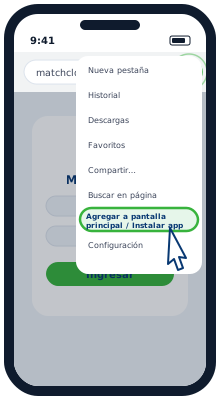
Choose “Add to Home screen”
On some phones the option is called “Install app” or “Install application”.
- 4
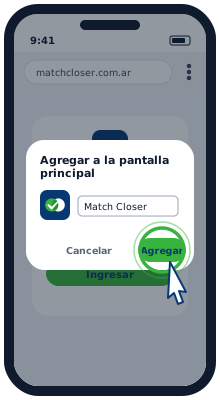
Confirm with “Add”
If another window appears, tap Add or Install again.
- 5
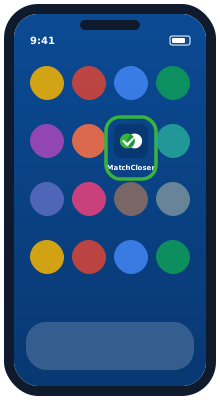
Done!
The Match Closer icon stays on your screen. Tap it to go straight in, like any other app.
Important: on iPhone it only works from Safari. If you opened the link from WhatsApp, Gmail or Chrome, tap “Open in Safari” first.
- 1
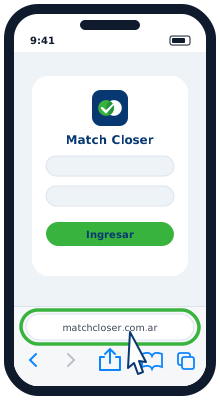
Open MatchCloser in Safari
It has to be Safari (the blue compass). Go to matchcloser.com.ar.
- 2
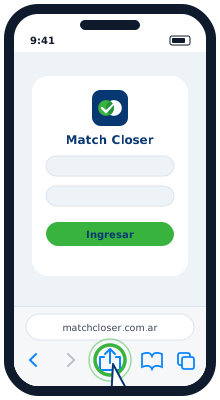
Tap the Share button
It’s the square with an arrow pointing up, in the bottom bar (on iPad, at the top).
- 3
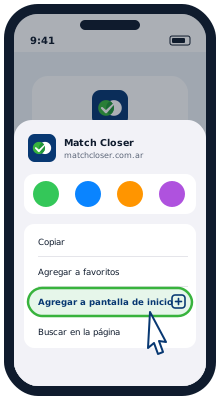
Choose “Add to Home Screen”
Scroll the list up if you don’t see it right away.
- 4
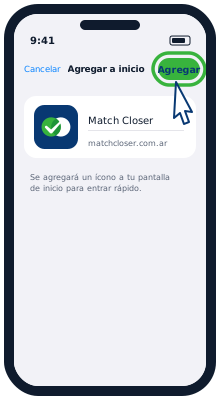
Tap “Add”
It’s at the top right. You can keep the name Match Closer.
- 5
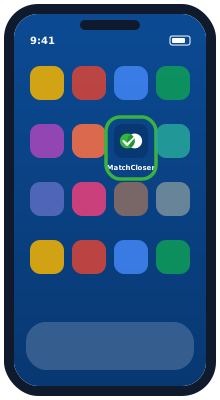
Done!
The Match Closer icon stays on your home screen. Tap it to go straight in.